 English


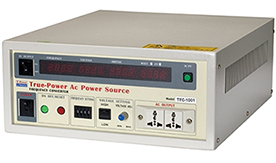
產品特點
-
低失真干擾。
-
高效率、省能源。
-
反應快、適用特殊負載。
-
可選擇加大電壓範圍至600V。
-
數位電壓錶、電流錶、瓦特錶、頻率錶。
-
高準確度之數位合成正弦波產生器。
-
輸出頻率可達40~499Hz。
-
容量大、體積小之晶體式/高頻式標準電源


Use the buttons below to find the page element that wraps all the repeating elements of your table or list-like content. Refresh the page and relaunch the workshop to reflect any options changes. Try Table Capture Pro to be able to capture multi-page tables (demo) and tables whose content changes dynamically (demo). Also, try Table Capture Cloud (Beta) for a bunch of next-level features. If your table only shows a portion of its content on this page and needs to reload a new page to show more, enable paged capture. (See a demo) Next: Click whatever link or button will go to the next page. The extension will remember which table you're interested in. As long as it can find your table, it'll keep capturing its data as you go through pages. You have been capturing paged content. Turning paging off now will clear your previously captured data. Some tables grow and shrink as you scroll or allow you to load new data without the entire site reloading. Turn on dynamic table capture to detect and capture all the rows that are ever displayed. (See a demo) Turn on dynamic table capture only after you've selected the correct page element that wraps all the repeating elements of your table or list-like content. Next: Click whatever link or button will go to the next page. The extension will then try to click that button continuously until you turn off auto-paging. When you clip a recipe, Table Capture adds the data to one aggregate collection of data per recipe that you can later export as you so choose.

